리덕스 작업환경 설정 및 사용방법
리덕스를 사용하기위해 설치해야할 라이브러리들과 리덕스에서 사용하는 방법들을 알아보자
🌌 작업 환경 설정
리액트 프로젝트를 생성하여 그 디렉토리로 이동한 이후
$ yarn add redux react-redux
yarn 명령어를 사용하여 리덕스와 react-redux 라이브러리를 설치한다
🎨 디자인패턴
리액트 프로젝트에서 리덕스를 사용할 때 많이 사용하는 패턴은 Presentational and Container Component Pattern 이다
Container 컴포넌트는 리덕스와 연동하여 리덕스로부터 상태를 받아 오기도 하고 스토어에 액션을 디스패치 하기도 한다
Presentational 컴포넌트는 상태 관리가 이루어지지 않고, 그저 props를 받아와서 화면에 UI를 보여주기만 하는 컴포넌트이다
디자인 패턴에 대한 자세한 내용은 따로 게시글 작성하며 알아보자
💻 리덕스 코드 작성하기
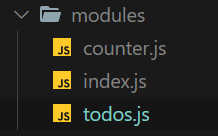
액션타입, 액션 생성 함수, 리듀서 함수를 기능별로 파일 하나에 몰아서 다 작성하는 이 방식을 Ducks 패턴이라 부른다.
액션타입, 액션 생성 함수, 리듀서 함수를 기능별로 파일 하나에 몰아서 다 작성하는 이 방식을 Ducks 패턴이라 부른다.
액션타입 정의
const INCREASE = 'counter/INCREASE';
const DECREASE = 'counter/DECREASE';
액션타입은 대문자로 정의한다. 문자열의 내용은 '모듈 이름/액션 이름'의 형태로 작성한다 !
문자열 안에 모듈 이름을 넣음으로써, 프로젝트가 커졌을 때 액션의 이름이 충돌되지 않게 방지해준다
액션 생성 함수 만들기
export const increase = () => ({ type: INCREASE });
export const decrease = () => ({ type: DECREASE });
export 키워드가 들어가는 이유는 다른 파일에서 불러와 사용할 수 있도록하기 위함이다
initialState 생성하기
const initialState = {
  number: 0,
};
initialState를 생성하여 리듀서에서 이를 불러와서 초기 상태로 사용할 수 있도록 한다
리듀서 생성하기
function counter(state = initialState, action) {
  switch (action.type) {
    case INCREASE:
      return {
        number: state.number + 1,
      };
    case DECREASE:
      return {
        number: state.number - 1,
      };

    default:
      return state;
  }
}

export default counter;
state는 initialState를 넣어 주어서 number 값을 설정해 주었고, 리듀서 함수에는 현재 상태를 참조하여 새로운 객체를 반환하는 코드를 작성해주었다. 마지막으로 export default 키워드로 함수를 내보내 주었다.
루트 리듀서 만들기
module 디렉토리 안에 index.js 파일을 만든 후에 아래와 같이 작성한다
import { combineReducers } from 'redux';
import counter from './counter';
import todos from './todos';

const rootReducer = combineReducers({
  counter,
  todos,
});

export default rootReducer;
리듀서가 2개 이상일 경우에 combineReducer라는 유틸 함수를 사용하여 rootReducer로 만들어 준다
나중에 불러올 때는
import rootReducer from '/modules';
이런 식으로 import하여 불러올 수 있다
스토어 만들기 & Provider 컴포넌트 사용하여 리덕스 적용하기
우선 createStore를 사용하여 rootReducer를 리듀서로 사용함을 알려주고 스토어를 생성한다
import React from 'react';
import ReactDOM from 'react-dom';
import { createStore } from 'redux';
import './index.css';
import App from './App';
import rootReducer from './modules';
import { Provider } from 'react-redux';

const store = createStore(rootReducer);

ReactDOM.render(
  <Provider store={store}>
    <App />
  </Provider>
  document.getElementById('root')
);
리액트 컴포넌트에서 스토어를 사용할 수 잇도록 App 컴포넌트를 react-redux에서 제공하는 Provider 컴포넌트로 감싸 준다. 이 컴포넌트를 사용할 때는 store를 props로 전달해 주어야 한다
Redux DevTools의 설치 및 적용
Redux DevTools는 리덕스 개발자 도구이며, 크롬 확장 프로그램으로 설치하여 사용할 수 있다.
리덕스를 사용하여 개발할 때 상태관리를 더욱 편하게 도와준다.
const store = createStore(
  rootReducer,
  window.devToolsExtension && window.devToolsExtension(),
);
확장 프로그램을 설치하면 편하지만 어떤 오류에서인지 작동을 하지 않아 위와같이 코드를 작성하면 사용이 가능하다..!
Connect 사용하기
CounterContainers 컴포넌트
import React from 'react';
import Counter from '../components/Counter';

const CounterContainer = () => {
  return <Counter />;
};

export default CounterContainer;
위 컴포넌트를 리덕스와 연동하기위해 react-redux에서 제공하는 connect 함수를 사용해야 한다
connect(mapStateToProps, mapDispatchToProps)(연동할 컴포넌트)
mapStateToProps는 리덕스 스토어 안의 상태를 컴포넌트의 props로 넘겨주기 위해 사용한다
mapDispatchToProps는 액션 생성 함수를 컴포넌트의 props로 넘겨주기 위해 사용한다
const CounterContainer = ({number, increase, decrease}) => {
	return (
    <Counter number={number} onIncrease={increase} onDecrease={decrease} />
    );
};

const mapStateToProps = state => ({
  number: state.counter.number,
});

const mapDispatchToProps = dispatch => ({
  increase: () => {
    dispatch(increase());
  },
  decrease: () => {
    dispatch(dispatch());
  },
});
export default connect(
  mapStateToProps,
  mapDispatchToProps,(CounterContainer);
)
mapStateToProps는 스토어의 상태를 Props로 넘겨주고 mapDispatchToProps는 store의 내장 함수 dispatch를 파라미터로 받아 Props로 넘겨준다
connect 함수를 익명함수로 깔끔하게 사용하기
connect 함수 내부에 익명 함수로 선언해서 코드를 깔끔하게 만들어 보자
const CounterContainer = ({ number, increase, decrease }) => {
  return (
    <Counter number={number} onIncrease={increase} onDecrease={decrease} />
  );
};

const mapStateToProps = (state) => ({
  number: state.counter.number,
});

export default connect(
  (state) => ({
    number: state.counter.number,
  }),
  (dispatch) => ({
    increase: () => dispatch(increase()),
    decrease: () => dispatch(decrease()),
  }),
)(CounterContainer);
익명 함수로 선언해서 더 깔끔해진 코드를 볼 수 있다.
bindActionCreators를 사용하여 dispatch 간편하게 사용하기
컴포넌트에서 액션 생성 함수를 호출하여 디스패치하기 위해 각 액션 생성 함수를 호출하고 dispatch로 감싸는 작업이 번거로울 수 있다 특히 액션 생섬 함수의 개수가 많아 진다면 더더욱 번거로워 진다 이를 더 편하게 하기위하여
리덕스에서 제공하는 bindActionCreators 유틸 함수를 이용해보자
import React, { useCallback } from 'react';
import { bindActionCreators } from 'redux';
import { connect } from 'react-redux';
import Counter from '../components/Counter';
import { increase, decrease } from '../modules/counter';

const CounterContainer = ({ number, increase, decrease }) => {
  return (
    <Counter number={number} onIncrease={increase} onDecrease={decrease} />
  );
};

const mapStateToProps = (state) => ({
  number: state.counter.number,
});

export default connect(
  (state) => ({
    number: state.counter.number,
  }),
  (dispatch) =>
    bindActionCreators(
      {
        increase,
        decrease,
      },
      dispatch,
    ),
)(CounterContainer);
위 처럼 하면 bindActionCreators 함수를 사용할 수 있지만 더 간편하게 사용 할 수 있는 방법이 있다.
mapDispatchToProps에 해당 파라미터를 함수 형태가 아닌 액션 생성 함수로 이루어진 객체 형태로 넣어주면 된다 .
이 경우에는 bindActionCreators를 사용하지 않는다.
import React, { useCallback } from 'react';
import { connect } from 'react-redux';
import Counter from '../components/Counter';
import { increase, decrease } from '../modules/counter';

const CounterContainer = ({ number, increase, decrease }) => {
  return (
    <Counter number={number} onIncrease={increase} onDecrease={decrease} />
  );
};

const mapStateToProps = (state) => ({
  number: state.counter.number,
});

export default connect(
  (state) => ({
    number: state.counter.number,
  }),
  {
    increase,
    decrease,
  },
)(CounterContainer);
위와 같이 두 번째 파라미터를 객체 형태로 넣어주면 connect 함수가 내부적으로 bindActionCreators 작업을 대신한다
✨ 리덕스 더 편하게 사용하기
redux-actions
redux-actions를 사용하면 액션 생성 함수를 더욱 간결하게 작성할 수 있다.
또 리듀서 함수를 작성할 때 switch문이 아닌 handleActions라는 함수를 사용하여 각 액션마다 업데이트 함수를 설정하는 형식으로 작성 할 수 있다.
$ yarn add redux-actions
CreateAction
counter.js
import { createAction, handleActions } from 'redux-actions';

const INCREASE = 'counter/INCREASE';
const DECREASE = 'counter/DECREASE';

export const increase = createAction(INCREASE);
export const decrease = createAction(DECREASE);
위와 같이 createAction을 사용하면 번거롭게 매번 객체를 생성할 필요 없이 간단하게 액션 생성 함수를 선언할 수 있다.
handleActions
리듀서 함수의 가독성을 높게하기 위해 handleActions라는 함수를 사용해보자
import { createAction, handleActions } from 'redux-actions';

const INCREASE = 'counter/INCREASE';
const DECREASE = 'counter/DECREASE';

export const increase = createAction(INCREASE);
export const decrease = createAction(DECREASE);

const initialState = {
  number: 0,
};

const counter = handleActions(
  {
    [INCREASE]: (state, action) => ({ number: state.number + 1 }),
    [DECREASE]: (state, action) => ({ number: state.number - 1 }),
  },
  initialState,
);

export default counter;
handleActions 함수의 첫 번째 파라미터에는 각 액션에 대한 업데이트 함수를 넣어주고 두 번째 파라미터에는 초기 상태를 넣어 준다
액션 생성 함수에서 파라미터를 필요로 하는 경우 createAction 사용하기
createAction으로 액션을 만들면 액션에 필요한 추가 데이터는 payload라는 이름을 사용한다
예 )
const MY_ACTION = 'sample/MY_ACTION';
const myAction = createAction(MY_ACTION, text => `${text}`;
const actopn = myAction('hello world!');

/*
  결과 :
  { type: MY_ACTION, payload" 'hello world!' }
*/
이제 파라미터를 필요로하는 경우의 액션 생성 함수를 createAction 으로 만들어 보자
import { createAction } from 'redux-actions';

const CHANGE_INPUT = 'sample/CHANGE_INPUT'; // input을 변경하는 액션
const INSERT = 'sample/INSERT'; // 새로운 todo를 등록하는 액션

export const changeInput = createAction(CHANGE_INPUT, (input) => input);
export const insert = createAction(INSERT, (text) => ({
  id: id++,
  text,
  done: false,
}));
insert의 경우 새로운 객체를 액션 객체 안에 넣어 주어야 하기 때문에 두 번째 파라미터에 text를 넣으면
text를 추가한 새로운 객체가 반환되는 함수를 넣어준다
changeInput의 경우 input => input 형태로 파라미터를 그대로 반환하는 함수를 넣었지만 이 작업이 필수는 아니다.
생략해도 똑같이 작동하지만, 코드를 보았을 때 이 액션 생성 함수의 파라미터로 어떤 값이 필요한지 쉽게 파악할 수 있기 때문에 이렇게 작성하도록 하자
handleActions로 리듀서를 재작성 해보기
createAction으로 만든 액션 생성 함수는 파라미터로 받은 값을 객체에 넣을 때 임의의 이름으로 넣는 것이 아닌,
action.payload라는 이름을 공통적으로 넣어야 한다
const todos = handleActions(
  {
    [CHANGE_INPUT]: (state, action) => ({ ...state, action.payload }),
    [INSERT]: (state, action) => ({
      ...state,
      todos: state.todos.concat(action.payload),
    }),
    [TOGGLE]: (state, action) => ({
      ...state,
      todos: state.todos.map((todo) =>
        todo.id === action.payload ? { ...todo, done: !todo.done } : todo
      ),
    }),
    [REMOVE]: (state, action) => ({
      ...state,
      todos: state.todos.filter((todo) => todo.id !== action.payload),
    }),
  },
  initialState
);
아래와 같이 비구조화 할당 문법을 사용하여 Action 값의 payload 이름을 새로 설정해 주면 payload가 어떤 값을 의미하는지 쉽게 파악이 가능하다.
const todos = handleActions(
  {
    [CHANGE_INPUT]: (state, { payload: input }) => ({ ...state, input }),
    [INSERT]: (state, { payload: todo }) => ({
      ...state,
      todos: state.todos.concat(todo),
    }),
    [TOGGLE]: (state, { payload: id }) => ({
      ...state,
      todos: state.todos.map((todo) =>
        todo.id === id ? { ...todo, done: !todo.done } : todo,
      ),
    }),
    [REMOVE]: (state, { payload: id }) => ({
      ...state,
      todos: state.todos.filter((todo) => todo.id !== id),
    }),
  },
  initialState,
);
payload의 값이 어떤 값을 뜻하는지 한눈에 쉽게 파악되어 보기 편해진다 !
Reference
(책) 리액트를 다루는 기술 - 김민준 (VELOPERT)